Apr 22, 2007

3 new wallpapers (Aa! Megamisama, Okami, Idolmaster)

3 new wallpapers:

Aa! Megamisama - Heavenly Dance (Vector/Abstract)
I wanted to go back to the walling styles from the early 2000's, and emulate Cynical126's popular formula - clean scan, soft gradients, abstract background, and sparkling bubbles... [more]


Okami - Samurai Snakes (Vexture/Minimalistic)
I just love Okami artwork, and have been wanting to make a wall for it for quite some time. It took a while to figure out what to do, though... [more]


Idolmaster - iDOL (Vector/Scenic)
I have actually been wanting to make an Idolmaster wall since Dom kept contending that the Go My Way dance could be interpreted as football referee signals... [more]

What's in a resolution?

Wallpaper resolution is a tricky thing. There are so many different sizes of monitors out there nowadays that it's hard to design for all of them. Generally, you just crop things to the right aspect ratio, which does mean you have to be careful about element placement.
I have a dual widescreen monitor display at work, and generally speaking, this is a rare thing to find. So every so often I make one for myself.
The question was, how do I make this wall look good on dual screens and single screens?
The answer: Move elements around.
I made two wallpapers here: a dual monitor version, and a single monitor version, and then cropped them to fit the relevant aspect ratios.
Dual monitor versions:


Single monitor versions:


It makes a difference, doesn't it?

Apr 20, 2007

Useful resource for typography

Thanks to the Google Personalized Homepage's new "Recommendations" feature, I found the following website:
Identifont
It allows you to either
a) Look up a font face by name
b) Look up a font by distinguishing features

B is time-consuming as it asks you to examine all the details possible on the font - the style of the lowercase 'g' or uppercase 'K', or how many lines are in a $, etc.
I haven't tried it out on any fonts in particular, but it looks extensive and possibly quite powerful, if you're trying to figure out a font someone else has used - or at the very least find something of a similar vein.

In either case, it'll return a graphic of the font (showing alpha characters) as well as information on the font and where you might be able to purchase it.

Nifty!

Apr 15, 2007

Walling Games

It's been a bit quiet at DA! That's because I've been hard at work on Round 2 of which?waller, which is a walling guessing game I'm running (and participating in) at Minitokyo. The idea of the game is to submit wallpapers anonymously, and then people have to guess who made each wall. It's an exercise in recognizing wall styles, trends, and just to have fun with a walling competition that doesn't have the typical pressures of creating something for a panel of judges.
If you're a member of Minitokyo, I encourage you to check out the game and try your hand at guessing.
Otherwise, you'll see what I made when round 2 ends next week!

Mar 22, 2007

1 new wallpaper (Nodame Cantabile - Nodame Noveau)

1 new wallpaper:
Nodame Cantabile - Nodame Nouveau (Vexture/Art Nouveau)
A Nodame Cantabile wall in the Art Nouveau style. You can never have enough Nouveau. Basically, I thought Nodame's pose in the scan was well suited to an Art Nouveau style portrait. The skeletal trees in the back had a Nouveau vibe anyhow, which is what tipped the scales for me. Also, I wanted to play with framing, where part of the character is inside the frame and part is in front... [more]

Mar 16, 2007

A run down of Painter IX's brushes (Part I)

This is an exploration of Painter IX's default brush set. Painter has a ton of brush sets mimicking natural media, and is best utilized with a tablet to gain pressure sensitivity. There are so many types of brushes, that it's hard to know which brush has what effects.

This is based off of Painter IX's brush set. Brush sets in other versions of Painter will vary. Painter arranages its brushes by categories, which are fairly broad collections of brushes with similar settings. They tend to vary by effect, brush size, brush tip shape, and pressure sensitivity.

What the chart means

  • Wet/Dry: Painter has two types of brushes: Wet and Dry. Wet brushes must be used on a "wet" layer, and cannot interact with Dry brushes unless the wet layer is dried. There is also a hybrid "digital wet" brush that combines some aspects of both wet and dry brushes (they combine the characteristics of wet brushes, but can be used on dry layers directly.) Some categories contain brushes for both sets (there are both wet erasers and dry erasers, for example.)
  • Blending: Some brushes pick up the color of other paints around them. Some do not.
  • Opacity: Some brushes have a greater dynamic range in opacity than others.
  • Brush tip: The general brush tip shape
  • Paper Grain: Denotes whether a brush picks up the texture of the paper's grain.

    Left: Where to change your paper's grain | Right What grain means for a Painter brush
  • Buildup: Some brushes build up color as you pass the brush over the same area multiple times.

    Above: Two brushes with different buildup characteristics.

And now, on to the brushes!

Acrylics [general info]

  • Sample brushes: thick acrylic bristle, thick opaque acrylic, wet acrylic
  • Wet/Dry: Dry.
  • Blending: Varies. "Wet" or "soft" acrylics tend to pick up more colors than other acrylics.
  • Opacity: Generally opaque. Slight opacity on brush edges.
  • Brush tip: Varies. Distinct brush fibers or flat tips.
  • Paper Grain: None
  • Buildup: None

Airbrushes [general info]

  • Sample brushes: coarse spray, soft airbrush, variable splatter
  • Wet/Dry: Dry.
  • Blending: None
  • Opacity: Varies from entirely opaque to almost entirely transparent. "Soft" airs are the most transparent.
  • Brush tip: Round, with either soft or hard edges. Most brushes have a spatter radius.
  • Paper Grain: None
  • Buildup: None

Artist Oils

  • Sample brushes: dry bristle, impasto oil, tapered oils
  • Wet/Dry: Dry.
  • Blending: High
  • Opacity: Mostly opaque
  • Brush tip: Generally square, tapers quickly.
  • Paper Grain: None
  • Buildup: None

Artists

  • Sample brushes: Impressionist, Seurat, Van Gogh
  • Wet/Dry: Dry.
  • Blending: None
  • Opacity: Generally opaque
  • Brush tip: Variable. Each brush is unique, mimicking a different artist's style.
  • Paper Grain: None
  • Buildup: None

Blenders

  • Sample brushes: Grainy blender on Pens, Oily blender on Oils, Soft blender on Pastels
  • Wet/Dry: Dry. Watercolor and Digital Watercolor blenders are contained in their respective categories.
  • Blending: Blenders are used to blend paints that have already been laid down on the canvas.
  • Opacity: N/A
  • Brush tip: Variable, but generally round
  • Paper Grain: None
  • Buildup: N/A

Calligraphy [general info]

  • Sample brushes: calligraphy brush, thin grainy pen
  • Wet/Dry: Dry.
  • Blending: None
  • Opacity: Fully opaque
  • Brush tip: Thin and at an angle
  • Paper Grain: None
  • Buildup: None

Chalk [general info]

  • Sample brushes: blunt chalk, square chalk, variable width chalk
  • Wet/Dry: Dry.
  • Blending: None
  • Opacity: Mostly opaque
  • Brush tip: Round or square
  • Paper Grain: Yes, generally strong
  • Buildup: None

Charcoal [general info]

  • Sample brushes: dull charcoal pencil, soft charcoal, soft vine charcoal
  • Wet/Dry: Dry.
  • Blending: None
  • Opacity: Mostly opaque
  • Brush tip: Round or square
  • Paper Grain: Yes, generally mild
  • Buildup: None

Cloner

  • Sample brushes: camel oil cloner, furry cloner, smeary flat cloner, all using same base pattern
  • Wet/Dry: Wet and Dry
  • Blending: None
  • Opacity: Varies.
  • Brush tip: Varies
  • Paper Grain: Varies
  • Buildup: Varies

Colored Pencils [general info]

  • Sample brushes: colored pencil, oily colored pencil, variable colored pencil
  • Wet/Dry: Dry
  • Blending: Some
  • Opacity: Partially transparent
  • Brush tip: Round and small
  • Paper Grain: Yes, generally mild
  • Buildup: Yes, generally mild

Conte [general info]

  • Sample brushes: dull conte, square conte, tapered conte
  • Wet/Dry: Dry
  • Blending: None
  • Opacity: Mostly opaque
  • Brush tip: Round or square, dense bristles
  • Paper Grain: None
  • Buildup: None

Mar 10, 2007

1 new wallpaper (Clover - Concert for a Little Bird)

1 new wallpaper:
Clover - Concert for a Little Bird (Vector/Minimalistic)
I just wanted to make something with an Art Deco vibe, and decided to create a concert poster for Oruha... [more]

Mar 4, 2007

1 new wallpaper (Paradise Kiss - Lonely in Gorgeous)

1 new wallpaper:
Paradise Kiss - Lonely in Gorgeous (Vector/Minimalistic)
Just a simple wallpaper. I saw this interesting photo when browsing Stock Exchange for unrelated stocks, and liked the striking color combination, and the strong diagonal lines in the image. I wanted to make a monochromatic wall with the purple and yellow the image had, and figured that something from Ai Yazawa would be bold enough to go with the scheme... [more]

Feb 14, 2007

Wallpaper Walkthrough: Painting "Under the Sakura"

This is a special Paint-o-Rama walkthrough for my wallpaper, "Under the Sakura" as part of the "Let there be Light" contest.

I used Photoshop 7.0 for scan reconstruction/post production and Painter 9.0 for watercolors.

Preparation: Scan Extension
I started off with this scan of Takamichi's artwork. Since this artwork was vertical, I basically had to redraw a bunch of cherry tree branches. You can see that process in this breakdown by layers.
The "sketch" layer was used to get a feeling for where I should start adding or extending the branches so that the wall felt full, and I didn't feel obliged to follow it too closely.
The "flowers" layer consists of 2 different flower sets extracted from the original scan, repeated at different intervals. In order to keep it from looking regular, I rotated most of the clones and resized them. As long as you can keep from creating a pattern, you should be able to distract the eye enough that people won't realize the flowers are cloned for a while.


Preparation: Setting up Painter
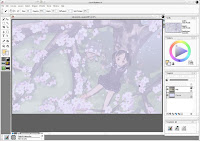
First, I set up the Painter interface. I took the extended scan from Photoshop and saved it as a bitmap. I opened this in Painter, moved the image from the background to a layer on top, reduced the opacity to 25% and locked it to prevent myself from accidentally moving or painting on it. I also set the background to a pale blue color. That way I'd know where I'd painted and where I hadn't.
I had the original bitmap open again so I could use it as my clone source. Then I set up my watercolor brush to clone and was ready to start painting!


Branch painting 1 - coloring the inside
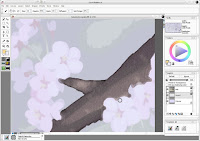
To start painting the branches (which are outlined) I first painted the inside of the branch with a 3-5px brush. You can see in the screenshot that the strokes overlapped the flowers. As long as the center of the brush doesn't cross over the edge of the flower, it will continue to paint in brown (that's why I use a larger brush.) I'll clean up the flowers' edges later, but this ensures there are no gaps.


Branch painting 2 - coloring the outside
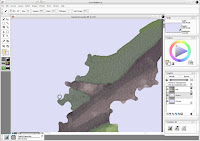
To continue painting the branches, I next painted the outside of the branch (the grassy area) with a 3-5px brush. I overlapped the grass over the edge of the branch similar to how I overlapped the flowers' edges in the previous step.


Branch Painting 3 - coloring the edges
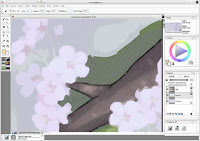
With a 1px brush, I went back and cleaned up the edges of the branch, making sure that I covered up all of the overlapping grass from the previous step. The 1px brush is laborious to use and usually too sharp for a good watercolor effect, so use it sparingly for the most fine of details, and stick with 3-5px brushes for most other parts (or for large swathes of grass, use 10-15px brushes to save time.)


Flower painting
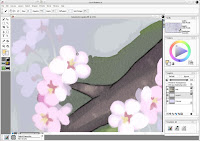
Painting the flowers uses the same ideas as painting the branches, except the flowers have no black edge on them. Start by painting from the center outwards. Since the branch painting steps already created an overlap, paint over the branch to create a nice crisp edge for the flowers. For the flower petals I used a 3-4px brush, and for the flower pistils/stamens, I used a 2px brush. For flower stems, I used a 1-2px brush.


Tree painting
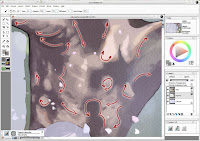
Painting the tree is similar to painting the branches. Where branch texture tends to go in one direction, however, the trunk of the tree has textures going in all directions. When painting a section like a tree trunk, always keep in mind which direction your brush strokes should go in to maintain a good edge and transition between colors.


Painting the girl
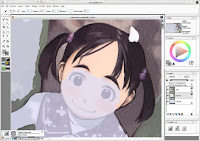
Painting the girl is just like painting the rest of the wall. However, the girl has the most details, so you'll want to be very careful with edges and corners. This is about the only place where I used the 1px brush extensively.


Done!
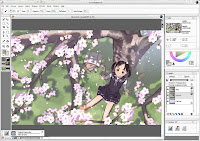
Keep painting and painting and eventually you'll finish!
You might notice that I redid the grass on the left side of this screenshot compared to the Painter prep screenshot. After watercoloring the grass, the scan extension didn't mesh well with the scan, so went back and added more details, more gaps in the shadows, and more variations in the green. I thought I could be lazy, but that didn't work out.


Post-Production
After I finished watercoloring, I saved it as a bitmap again and opened it up in Photoshop for post-production. This involved some color and level adjustment (I toned down the saturation of the image and skewed it towards pink) and adding some extra watercolor texture (so that even the white areas show texture, as you might expect from seeing a watercolor on paper), and added some text (which took a while to figure out.) Then you're ready to export as jpegs and post it for all to see.

Well, that's one way you can create a wallpaper that looks like it was watercolored. Hope you learned something along the way, or at least had fun seeing how this wall was put together.

1 new wallpaper (Takamichi - Under the Sakura)

1 new wallpaper:
Takamichi - Under the Sakura (Painted/Scenic)
My entry for Paint-o-Rama's "Let there be Light" contest. Yes, it's loli-tastic. I dedicate it to Osi just because of that. Actually, I chose the scan because I decided to go for the "light filtered through trees" sort of lighting, and because it had a nice spring theme to it... [more]